Anatomy of a GistBrief brief: why every summary has the same shape
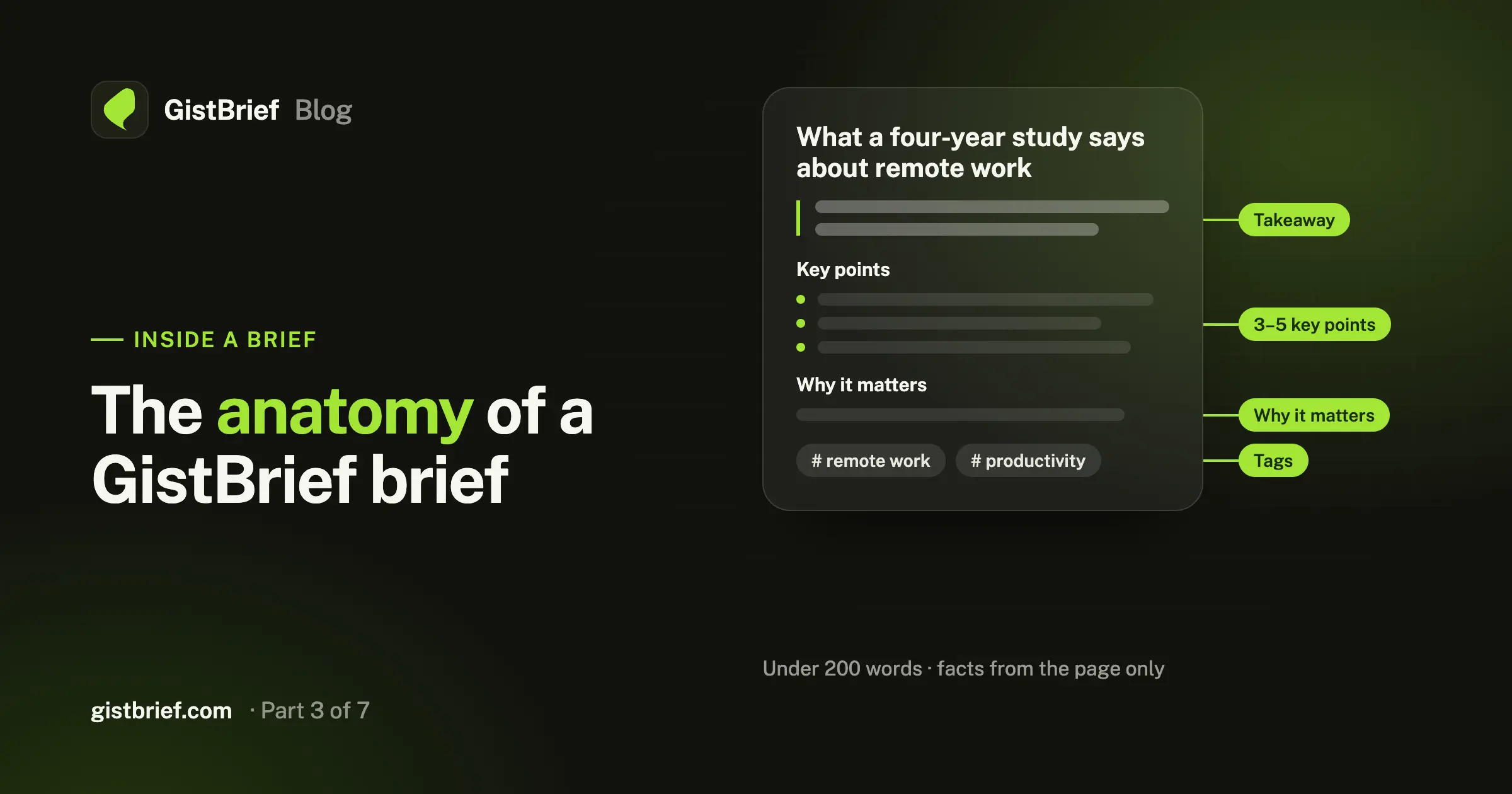
Takeaway, key points, why it matters, tags. Here's how a GistBrief brief is built, the rules behind it, and how to choose the AI model that writes it.
Farid Vatani
3 min read
Anatomy of a GistBrief brief: why every summary has the same shape
Most AI summaries share a problem: they read like a shorter, blurrier copy of the original. You still have to read the whole thing to find out whether it matters to you.
A GistBrief brief is built differently. It isn't a mini article. It's a decision tool, made so you can absorb it in under a minute and trust it without opening the original.
To get there, every brief has the same four parts.
1. The takeaway
The first paragraph of every brief is one or two plain sentences with the core point. No heading, no bold, no "This article discusses…" warm-up.
The takeaway also shows on its own on the item's card in your library, so when you scroll your library you're reading the core idea of each page, not a list of titles.
Teams that worked remotely kept their output steady but spent 30% more time in meetings. The biggest gains came from fewer, written updates instead of status calls.
If you only read one line, this is the line.
2. Key points
Next comes a short Key points section: three to five bullets, and each one is a single concrete thing from the page, such as:
- a fact or a number,
- an argument the author makes,
- a step in a process.
Bullets start with the idea itself, not with "The author says…". Specifics are kept: names, figures, dates, version numbers. Code identifiers, commands and file names are formatted as code so they're easy to copy.
3. Why it matters
The brief ends with one or two sentences on who the page is useful for and what they can do with it. This is the part that turns "interesting" into "useful": it tells you whether this page belongs in your work this week or can wait.
4. Tags
Every brief also gets three to five tags, chosen to describe what the page is about:
- Topics, not formats.
prompt engineeringinstead ofguide;sleepinstead ofblog post. - Short and lowercase, one to three words each.
- Common names for technologies and fields:
typescript,machine learning. - Most specific first, most general last.
Click a tag anywhere in your library and you'll see everything else on that topic. Over time your library sorts itself.
The rules that keep briefs honest
A summary is only useful if you can trust it. Every brief follows a few strict rules:
- Only what the page says. No invented facts, numbers, names or quotes. If the page is thin, the brief is shorter. It isn't padded.
- No clutter. Navigation, cookie banners, ads, sign-up prompts and comments are ignored.
- The right approach for the page type. Tutorials and docs get what they teach and the key steps. News gets what happened, who's involved and when. Opinion pieces get the author's position and main arguments. Research gets the question, method and findings.
- Neutral and plain. No hype, no emojis, no opinions of its own.
- Short. Under 200 words, always.
- Same language as the page. A German article gets a German brief.
Choose the model that writes it
Not every page needs the same horsepower. GistBrief lets you pick the AI model for each brief, from free options to more capable ones. The model picker shows each model's credit cost up front, and the default is marked, so you're never surprised.
Use a fast, cheap model for a quick news item, and a stronger one for a dense research paper or a long technical spec. Each item records which model wrote its brief, so you always know where a summary came from.
Brief now, or brief later
You can tick "Generate a summary" when you save a link, or save first and click Generate Summary on the item later. That's handy when you're collecting lots of sources quickly and only want briefs for the ones that make the cut.
See one for yourself
The best way to judge a brief is on a page you already know well. Save an article you've read recently and compare the brief to what you remember.